




























Custom Virtual Labs on CloudLabs
Your product, your use case, delivered on CloudLabs
Build hands-on lab experiences that match how your product is actually used. Custom infrastructure, custom workflows, white-labeled, on the platform trusted by ISVs, enterprises, and education.
Overview
Custom software labs that scale across ISVs, enterprises, and education
Plan, curate, deploy, and share your own custom software lab environments with CloudLabs that are interactive, engaging, guided, and effective, catering to the unique training needs of ISVs, enterprises, educational institutes, and training providers from all over the globe. Powered by public cloud platforms, including Microsoft Azure, Amazon Web Services (AWS) & Google Compute Engine, CloudLabs ensures native integration, enabling one to build and host all types of custom software lab experiences.
Use cases
-
Software Development and Testing
Developers test new applications, troubleshoot issues, and experiment with configurations over isolated environments without affecting production systems.
-
Training and Skill Development
ISVs and enterprises trust CloudLabs to curate custom labs, providing hands-on experience over cloud technologies: Machine Learning, AI, Azure, Check Point, etc.
-
Proof of Concepts (POCs)
Tech teams build custom software lab environments to test new features, conduct research, or prototype new applications before investing in full-scale deployment.
-
CI/CD Pipeline and DevOps Testing
DevOps teams configure isolated labs to simulate production environments, test deployment processes, and run CI/CD pipelines.
-
Penetration Testing
Security professionals can create simulated attack environments for penetration testing, vulnerability scanning, and incident response training.
-
Multi-Cloud Strategy Testing
Organizations adopting a multi-cloud strategy, leverage custom labs to test configurations, ensuring seamless interoperability between AWS, Azure, and GCP environments.
-
10+
Years of industry expertise
-
1M
Labs provisioned worldwide
-
5M
Participants enabled
-
25K
Events supported
Build labs around your exact requirements
CloudLabs gives you the flexibility to design lab experiences around your product, your audience, and your delivery model — without forcing tradeoffs.
-
Infrastructure on Demand
Configure lab environments around your product. Choose your cloud, set up tools and dependencies, and define how each environment behaves during usage.
-
Custom Lab Workflows
Design the full lab experience with guided steps, completion criteria, and challenge-based flows.
-
Flexible User Control
Control access levels, permissions, and roles that match your audiences and programs.
-
White-Labeled Experience
Deliver labs as part of your own platform. Apply your branding, use a custom domain, and keep experiences consistent for every user.
-
LMS & Platform Integration
Plug labs into Moodle, Canvas, and other LMS platforms via LTI for a seamless learning journey.
-
Custom Landing Experiences
Create dedicated landing pages for different programs such as trainings, POCs, or workshops, tailored to each audience and goal.
Most-trusted by global ISVs of all sizes
Trusted by universities and schools from all over the world
CloudLabs offerings
-
Automated Lab Clean-Up
CloudLabs automates resource clean-up to ensure cost-efficiency when the lab duration is exhausted. Thus guaranteeing that no unwanted cloud costs are incurred and maintaining a scalable and cost-effective solution for everyone.
-
Cross Platform Integration
Experience seamless cross-platform integration between preferred cloud infrastructure and your own cloud security solution. Every user registering on CloudLabs and launching a lab will receive a unique cloud (AWS/GCP/Azure) account with pre-provisioned cloud infrastructure.
-
AWS EC2 Browser-Based Access
Users can seamlessly access lab VMs (hosted on AWS EC2) directly via their web browser. Lab VMs come preconfigured with the necessary tools and software, eliminating external downloads.
-
Built-In & Custom IAM Policies
With CloudLabs learners have just the right level of access, securely performing their tasks while adhering to real-world security compliance practices.
-
Premium Tools
CloudLabs automation capabilities enable seamless control and lab management. Set limits, restrict permissions, and configure budgets through platform native features.
Why CloudLabs?
-
Proven Track Record
CloudLabs has been consistently delivering top-notch solutions (custom labs, pre-configured labs) for the past 8+ years.
-
Re-Usable Labs
Configure your custom lab environments once continue to re-use your lab architecture for other courses with a click.
-
Easy Deployment
Set up complex sandbox environments on the go—Select your configuration, and CloudLabs will take care of the rest.
-
Multi-Cloud Support
Choose and work seamlessly across multiple clouds: AWS, Azure, GCP, & OCI within a single deployment backed by dedicated access.
-
Security and Compliance
Active compliance with SOC 2, GDPR, and other security policies ensures complete safety of data and information.
-
Premium Support
The CloudLabs support team offers premium 24/7 support, for 365 days ensuring a seamless experience at every step.
-
Bring Your Own Software
Integrate your cloud platform with any public cloud (Azure, AWS, GCP) backed by CloudLabs premium support.
-
Interactive Training Labs
Create hands-on custom labs for training, learning, and development, making it easier to impart practical knowledge.
Everything you need to run hands-on labs at scale
-
Browser-Based Access
Users launch and use labs directly from the browser. No setup, no installation.
-
Multi-Cloud Flexibility
Run labs on AWS, Azure, GCP, or your own infrastructure based on what your program needs.
-
LMS & Platform Integration
Plug into Moodle, Canvas, and other LMS platforms via LTI for a seamless learning flow.
-
Real-Time Instructor Support
Instructors monitor and assist learners in real time with Shadow VM access during sessions.
-
Usage Tracking & Reporting
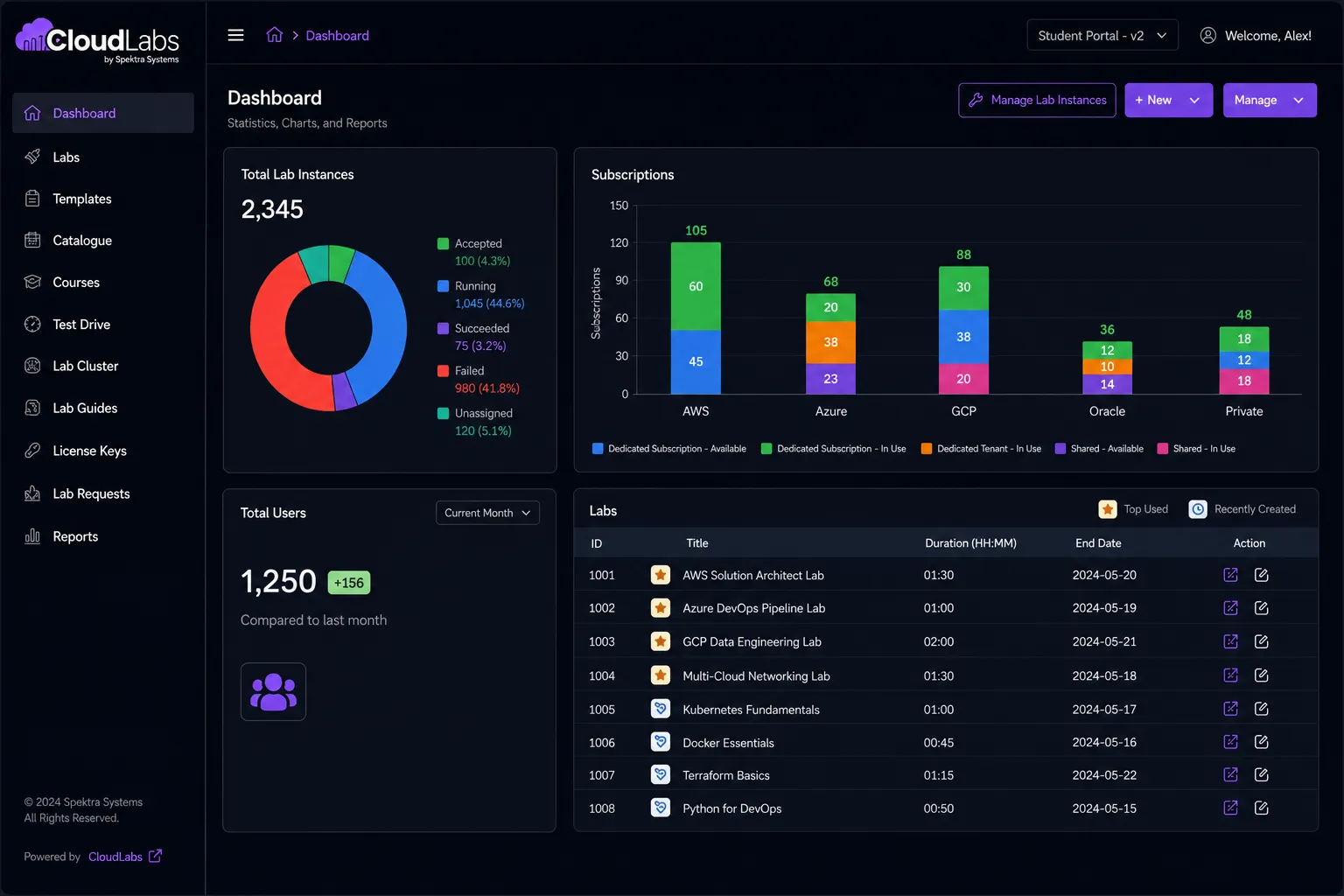
Monitor lab usage, activity, and costs with detailed reporting dashboards built in.
-
24/7 Support
Continuous support for lab setup, troubleshooting, and operations, whenever you need it.
CloudLabs custom virtual labs vs. DIY product environments
| CloudLabs Custom Virtual Labs | DIY Product Environments | |
|---|---|---|
| Setup time | Pre-configured or quickly customizable environments | Requires manual setup for each environment |
| Scalability | Supports small batches to large-scale usage | Scaling needs extra infrastructure planning and effort |
| Environment consistency | Standardized environments across all users | Variations likely across setups and sessions |
| User access | Browser-based, no installation required | Often needs local setup, VPNs, or credential management |
| Multi-VM & complex setups | Supports multi-VM, real-world configurations | Complex to design, deploy, and maintain |
| Lab guides & workflow control | Integrated step-by-step guides and completion tracking | Needs separate documentation and manual tracking |
| Automation | Built-in automation for deployment, reset, and cloning | Requires scripting and ongoing maintenance |
| Cost management | Usage tracking, scheduling, and auto-shutdown features | Harder to monitor and optimize resource usage |
| Instructor support | Shadow VM for real-time monitoring and assistance | Limited visibility into user environments |
| Integration | LMS integration (LTI), APIs, and custom portals | Requires custom development and integration work |
| Maintenance effort | Fully managed by the CloudLabs platform | Requires dedicated internal resources |
| Time to launch | Minutes to hours | Days to weeks, depending on complexity |
| Reliability | Built for consistent performance across sessions | Depends on internal infrastructure and setup quality |
Ready to build your custom software lab?
Share your custom lab requirements and we will help you with the best.
Be in control with CloudLabs custom lab experiences
-
Customize Registration Pages
Share your brand logo and content for lab registration pages to onboard participants.
-
Dedicated Lab Access
Configure – accept or reject participants per lab, add proctors/instructors as needed.
-
Advanced Controls
Schedule start, stop, and pause lab timings as an admin, besides configuring labs to be available for a specific time period of the day.
-
In-depth Reporting
Access Power BI-backed in-depth reports per lab. Gain insights on active labs and exhaustion dates.
-
Shadow VM
Admins and lab instructors have access to an over-the-shoulder view of all the lab VMs, providing real-time support and feedback.
-
Skill Validation
Lab instructors can validate and assign scores based on lab completion and track student progress in real time.
Deliver immersive experiences
-
Custom Lab Environment
-
Practice Tests
-
Quiz
-
Videos
-
Lab Content
-
Leaderboard
-
Lab VM Operations
-
Progress Tracking
Built your software lab
Let's help you get started
Share your custom lab requirements and we will help you with the best!
Pay-as-you-go
CloudLabs follows a transparent pricing model. You only need to pay for active lab environments.
24×7 globally
Global support options
Select your preferred data-residency region with CloudLabs, ensuring compliance and control over the location of your VMs. Access support and localization services available in a variety of languages — for a truly inclusive and seamless global experience.
Multi-language coverage
- English
- Español
- Français
- Deutsch
- Italiano
Regions
-
North America
Redmond, WA + Toronto, ON
-
EMEA
Bangalore + Hyderabad delivery hubs
-
APAC
Bangalore + Hyderabad delivery hubs
Sign up to build your own software labs
Are you a first-time user? No worries. Connect with us to get started.